IDEF0: Practical variations
The Quality Toolbook >
IDEF0 > Practical variations
When to use it | How to understand it |
Example | How to do it | Practical
variations
<-- Previous |
Next
-->
Practical variations
- As well as data items, glossary
pages can be written for activities, especially those that are not decomposed
further. Identify these as for data glossaries, but with a 'T' instead of the
'G'.
- Add description pages in the
form of figures, pictures or diagrams. Identify these as for data glossaries,
but with an 'F' instead of the 'G'. This can be used to show such as examples of
completed outputs.
- Produce 'special' one-off
diagrams for reviews which highlight lines and boxes for discussion. These may
also have extraneous detail removed.
- Add property labels to
activities and items to describe important properties, such as the temperature
of an input to a chemical process. Show these property labels as a number in a
square box, followed by the description. Connect this to the activity or item
with a wavy line. Glossaries are another good place for describing properties,
particularly if they are less important.
- Combine all Glossary pages into
a single glossary, sorted in alphabetical order.
- Data Flow Diagrams, as illustrated, are a similar tool to IDEF0, but do not show controls and mechanisms.
They also recognize that some things do not travel directly between processes,
but are put into storage, where they may be accessed as required by other
processes. They can be useful as a simpler and possibly less formal way of
describing processes or systems.
The top-level diagram is called the context diagram,
as it describes the inputs to and output from the overall process. Subsequent
diagrams decompose the detail of each sub-process (similar to IDEF0), with
circles showing processes, parallel lines showing storage and curved arrows
showing inputs and outputs.
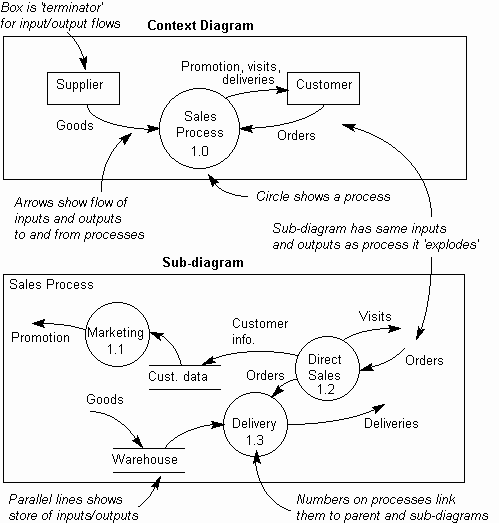
Fig. 1. Data Flow Diagrams
<-- Previous |
Next
-->
|